Table of Contents
- Understanding the Exposure Triangle for Gala Environments
- Best Camera Settings for Indoor Gala Photography: Aperture Priority Mode
- Shutter Speed and Motion Blur Prevention During Dynamic Events
- ISO Management and Noise Reduction in Dimly Lit Venues
- White Balance and Handling Mixed Lighting at Galas
- Flash Photography vs. Ambient Light: Best Practices for Gala Etiquette
- RAW vs. JPEG: Workflow Strategy for Fast-Paced Gala Events
- Advanced Focusing Techniques in Dark Environments
Last Updated: July 29, 2026
Capturing stunning images at an indoor gala requires mastering the exposure triangle and understanding how aperture, shutter speed, and ISO work together in low-light environments. This guide breaks down the specific camera configurations, techniques, and equipment choices that make the difference between blurry, underexposed shots and sharp, beautifully lit images.
Understanding the Exposure Triangle for Gala Environments
The exposure triangle consists of three interdependent variables: aperture, shutter speed, and ISO. Each controls how light reaches your sensor, and adjusting one requires compensating with the others. In gala photography, where lighting is unpredictable and subjects move constantly, understanding this relationship is essential.
Aperture controls how much light enters through the lens opening. Shutter speed determines how long the sensor is exposed to light. ISO controls the sensor’s sensitivity to light. When working in a dimly lit ballroom with stage lighting and candlelit tables, these three elements become your primary tools for achieving proper exposure without motion blur or excessive noise.
In low-light galas, prioritize aperture first. A wide aperture (f/1.8 or wider) is non-negotiable because it lets in the most light. Then adjust shutter speed to prevent motion blur, and finally raise ISO only as much as needed for proper exposure.
How Aperture, Shutter Speed, and ISO Work Together
When aperture is wide open at f/1.8, more light reaches your sensor, allowing you to use a faster shutter speed (like 1/250th) and keep ISO lower. If you’re forced to use a narrower aperture like f/2.8, you’ll need to slow your shutter speed or raise ISO to compensate. Every time you stop down one f-stop (from f/1.8 to f/2.8), you cut the light in half. To maintain the same exposure, you must either double your ISO or cut your shutter speed in half. In a gala where motion blur is unacceptable, you’ll usually increase ISO instead.
Best Camera Settings for Indoor Gala Photography: Aperture Priority Mode
Aperture Priority mode is the most reliable shooting mode for gala work. You set the aperture and ISO, and the camera automatically adjusts shutter speed to achieve proper exposure. Set your camera to "A" or "Av" on the mode dial, your aperture as wide as your lens allows (ideally f/1.8 or f/2.0), and your ISO to Auto with a maximum ceiling of 6400 or higher if your camera handles high ISO well.
Aperture Priority reduces mental load compared to full Manual mode. However, if the camera decides shutter speed needs to drop to 1/30th of a second, you’ll get motion blur. To prevent this, enable Shutter Speed Minimum or use exposure compensation to intentionally underexpose slightly, forcing the camera to maintain a faster shutter speed.
Never rely on Aperture Priority alone without monitoring your shutter speed. If you notice the camera is using shutter speeds slower than 1/125th, switch to Manual mode and raise ISO instead. Underexposure is easier to fix in post-production than motion blur.
Why F-Stop Matters in Low-Light Galas
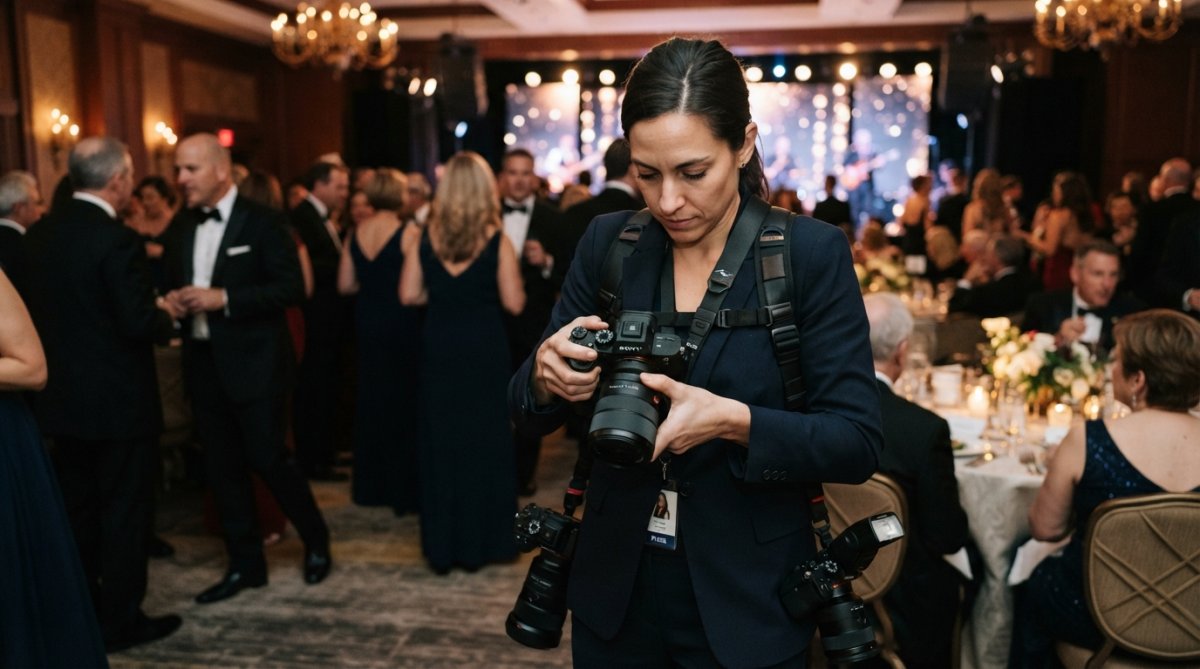
The f-stop directly determines how much light your lens gathers. An f/1.8 lens gathers roughly four times more light than an f/5.6 lens. In a gala with minimal ambient light, this difference is critical. At f/1.8 versus f/2.8, you’re not just getting brighter images, you’re gaining the ability to use faster shutter speeds. Wider apertures also create shallow depth of field, isolating your subject from the busy background.
Prime Lens vs. Zoom for Gala Work
Prime lenses have fixed focal lengths and typically offer wider maximum apertures than zoom lenses. A prime like the Canon RF 50mm f/1.2 or Sony 85mm f/1.4 gives exceptional low-light performance and beautiful subject isolation. Zoom lenses, like the Canon RF 24-70mm f/2.8 L IS USM, offer versatility without changing lenses. Most zoom lenses max out at f/2.8, while many primes reach f/1.4 or wider. For gala photography, a zoom lens at f/2.8 is generally sufficient if you’re willing to raise ISO when needed.
| Lens Type | Max Aperture | Best For | Trade-offs |
|---|---|---|---|
| Prime (50mm f/1.2) | f/1.2-f/1.4 | Low light, portraits | Single focal length, must swap lenses |
| Standard zoom (24-70mm f/2.8) | f/2.8 | Versatility, fast movement | Slightly less light than prime |
| Wide zoom (16-35mm f/2.8) | f/2.8 | Room shots, environmental | Distortion at widest end |
Many professional gala photographers carry both: a standard zoom for flexibility and a fast prime (like 85mm) for portraits during key moments.
Shutter Speed and Motion Blur Prevention During Dynamic Events
Shutter speed controls how long your sensor is exposed to light. A fast shutter speed (1/500th) freezes motion. A slow shutter speed (1/30th) allows motion to blur. At a gala, you need shutter speed fast enough to freeze guests moving, dancing, or raising glasses. Aim for at least 1/125th of a second, preferably 1/250th. When the room is very dark, achieving 1/250th at f/2.8 might require ISO 6400 or higher. This is acceptable. Noise from high ISO is less objectionable than motion blur.
Set your minimum shutter speed based on subject movement, not focal length. At a gala, 1/200th of a second is a safe baseline. If guests are mostly still, 1/125th works. If you’re capturing the dance floor, use 1/400th or faster.
ISO Management and Noise Reduction in Dimly Lit Venues
ISO amplifies your sensor’s sensitivity to light. Low ISO (100-400) produces clean images. High ISO (3200-12800) produces noisier images but allows faster shutter speeds in dark environments. Modern cameras handle ISO well; the Sony Alpha a7 IV and Canon EOS R5 produce usable images at ISO 6400 with minimal noise.
Shoot a test image at different ISOs in your venue before the gala starts to identify your acceptable ISO ceiling. Many photographers set their camera to Auto ISO with a maximum limit and a minimum shutter speed of 1/200th. Post-production noise reduction in Adobe Lightroom or Capture One Pro can reduce visible noise significantly, though aggressive noise reduction also softens fine details.
White Balance and Handling Mixed Lighting at Galas
Galas typically feature mixed lighting: warm tungsten lights, cool LED uplighting, stage lighting that shifts colors, and candlelight. The best approach is to shoot in RAW format and adjust white balance in post-production. RAW files preserve all color information, giving you full flexibility to correct color temperature later.
Shoot a white balance reference photo at the beginning of the event. Photograph a white napkin or white plate under the venue’s lighting. This gives you a reference point for correcting color temperature across all your gala images in post-production.
Dealing with Flickering LED and Stage Lights
LED lights and some stage lighting flicker at a frequency invisible to the human eye but visible in photographs if your shutter speed aligns with the flicker frequency. To avoid flicker, use shutter speeds like 1/125th, 1/160th, 1/200th, and 1/250th, which are generally safe. Avoid 1/60th, 1/120th, and other speeds that are multiples of the flicker frequency. Some cameras include an anti-flicker mode in the menu; enable this if your camera offers it.
Flash Photography vs. Ambient Light: Best Practices for Gala Etiquette
Flash adds light to dark scenes but can be jarring in an elegant gala setting. The best approach is to use ambient light as your primary exposure source and flash only as a fill light or backup. Ambient light photography requires wide apertures, fast shutter speeds, and higher ISO. If you can expose properly with ambient light, do so. Your images will look more natural and less intrusive.
In very dark areas or when you need to freeze fast motion, fill flash helps. A small on-camera flash like the Godox V1 Flash provides supplemental light without overwhelming the scene. Use it on low power (1/4 or 1/8 output). Flash also raises ethical concerns at galas. Many gala hosts prefer photographers who work with available light only. Ask the event organizer about flash policies before you arrive.
Flash Modifiers for Gala Environments
Flash modifiers shape and soften flash light. The MagMod MagSphere 2 attaches magnetically to round-head flashes and diffuses light into a soft, omni-directional pattern, producing more flattering light than direct flash. For larger venues, consider bouncing flash off a white ceiling or wall instead of using a diffuser. Bounced flash travels farther and fills more of the room. Avoid using flash on full power at a gala; use low power (1/8 to 1/4 output) with a diffuser.
RAW vs. JPEG: Workflow Strategy for Fast-Paced Gala Events
RAW files contain all the color and exposure information your sensor captured. JPEG files are compressed and processed, with white balance, exposure, and color already baked in. For gala photography, RAW offers significant advantages in post-production flexibility. RAW files are larger and require more storage and processing power. A SanDisk Extreme Pro SD Card with up to 200MB/s read speeds and V30 video speed class ensures you won’t experience buffer issues during burst shooting.
Shoot RAW for galas. The post-production flexibility justifies the extra storage and processing time. Use fast SD cards to prevent buffer issues during burst shooting. Invest in a strong backup system; gala images are irreplaceable.
Advanced Focusing Techniques in Dark Environments
Autofocus struggles in low light. Your camera’s autofocus system relies on contrast to lock focus, and dark venues have minimal contrast. Modern mirrorless cameras with phase-detection autofocus perform better than older DSLR systems. To improve autofocus reliability, use single-point autofocus instead of zone or automatic modes. Enable back-button focus by reassigning the AF-ON button to initiate autofocus instead of the shutter button. In very dark areas, use focus assist light if your camera offers it, though it’s distracting to guests. If autofocus fails, switch to manual focus.
Burst Mode and Focus Tracking for Moving Subjects
Burst mode captures multiple images per second, increasing the odds of capturing a sharp, well-composed shot during fast action. Modern mirrorless cameras offer fast burst rates. The Canon EOS R5 shoots up to 20 frames per second with electronic shutter. The Sony Alpha a7 IV shoots 10 frames per second. Enable continuous autofocus (AF-C or AI Servo) when shooting burst mode. Enable Eye AF if your camera offers it; it locks focus to eyes automatically, keeping faces sharp even during movement.
| Technique | Best For | Pros | Cons |
|---|---|---|---|
| Single-point AF | Posed shots, speeches | Precise, reliable | Requires manual point selection |
| Continuous AF + tracking | Dancing, movement | Automatic, fast | Can hunt in low light |
| Manual focus | Very dark areas, fast action | Always works | Requires skill and attention |
| Burst mode + AF-C | Candid moments | Captures multiple frames | Uses more storage, requires culling |
Mastering the best camera settings for indoor gala photography requires understanding how aperture, shutter speed, and ISO interact in low-light environments. Wide apertures, fast shutter speeds, higher ISO, and RAW file formats have become the industry standard for professional event work. Event Photojournalism uses these exact techniques to deliver sharp, beautifully exposed images in challenging gala lighting. Ready to elevate your gala photography? Contact Event Photojournalism to discuss how our award-winning team can capture your next event with stunning technical execution and authentic photojournalistic style.
Frequently Asked Questions
What is the best aperture setting for indoor gala photography?
For best camera settings for indoor gala photography, use the widest aperture your lens allows, typically f/1.4 to f/2.8. Wide apertures (low f-numbers) maximize light gathering in dim venues and create shallow depth of field for flattering subject isolation. Prime lenses with f/1.4 or f/1.8 apertures excel in gala environments where ambient light is limited and you need fast, reliable autofocus tracking.
Should I shoot in RAW or JPEG for fast-paced gala events?
RAW format gives you maximum flexibility in post-production for color correction, white balance adjustment, and noise reduction, critical when dealing with mixed lighting common at galas. However, RAW files require more storage and slower write speeds. Many professionals use RAW + JPEG simultaneously: RAW for final deliverables, JPEG for quick client previews and press releases. Choose based on your delivery timeline and backup capacity.
How do I prevent motion blur while maintaining low ISO at galas?
Use shutter speed of at least 1/125th of a second for stationary subjects, 1/250th for moving guests, and 1/500th for dancing or fast movement. Pair this with aperture priority mode and let your camera adjust ISO automatically within a safe range (typically 1600-6400 for modern full-frame sensors). In-body image stabilization also helps you shoot at slightly slower speeds without blur, extending your low-light capability.
How do I handle flickering LED and stage lights in gala photography?
Flickering occurs when shutter speed syncs with light frequency cycles. Set your shutter speed to 1/200th or faster to minimize flicker visibility. Use high-speed sync (HSS) flash if available. Shoot in RAW to correct color temperature shifts in post-production using Adobe Lightroom or Capture One Pro. If possible, position yourself away from direct stage light and rely on ambient venue lighting supplemented by diffused flash.
This article was written using GrandRanker