
Table of Contents
- Set Clear Goals and Communicate Session Expectations
- Corporate Headshot Dress Code Guidelines for Authenticity
- How Long Does a Corporate Headshot Take per Employee
- Scheduling and Advance Notice: The Three-Week Rule
- Hair, Makeup, and Grooming Tips for Camera-Ready Results
- Corporate Headshot Email Template for Employees
- Day-of Logistics and Post-Session Asset Management
- Frequently Asked Questions
Last Updated: September 20, 2026
Set Clear Goals and Communicate Session Expectations
Before your team steps in front of the camera, understanding how to prepare employees for corporate headshot sessions starts with defining what success looks like. Are you updating LinkedIn profiles? Building an annual report? Creating marketing materials? The goal shapes everything that follows.
Clear communication prevents confusion. Send employees a detailed email at least three weeks before the shoot that outlines the purpose, what to wear, and what to expect. This simple step reduces anxiety and improves results. According to Headshots Inc.’s corporate photography checklist, notifying employees at least three weeks in advance ensures proper preparation and higher participation rates.
Include a sample photo in your communication showing the style you’re aiming for. This gives employees a concrete reference point and reduces day-of surprises.
Corporate Headshot Dress Code Guidelines for Authenticity
Formal-only dress codes backfire: employees in uncomfortable stiff suits show visible tension in photos.
Encourage employees to wear clothing that reflects their actual work environment, business casual for business casual teams, creative styles for creative industries.
The core principle is consistency. Everyone should follow similar guidelines so the final collection feels cohesive. Here’s what works across most corporate environments:
- Solid colors over busy patterns (patterns distract from faces)
- Jewel tones and neutrals photograph better than bright neons or pure white
- Fitted clothing that flatters (avoid oversized or baggy fits)
- No logos or distracting graphics that pull focus from the person
- Layers so employees can adjust comfort during the shoot
According to Lauren Lindley Photography’s corporate attire guidance, the shift toward authentic workplace clothing has improved employee comfort and photo quality. Employees feel more confident when dressed in their everyday professional style.
Accessibility and Inclusivity in Dress Code
Religious and cultural attire:
Explicitly state that religious and cultural clothing, hijabs, turbans, yarmulkes, dashikis, is welcome and encouraged as part of professional identity.
Brief photographers unfamiliar with diverse attire: certain fabrics and colors may require lighting adjustments based on skin tone.
Mobility and physical accessibility:
Offer seated headshot options for employees with mobility challenges. Seated poses are equally professional with adjusted background and camera angle.
Neurodivergent and sensory considerations:
Some employees have sensory sensitivities to bright lights or crowded spaces, or social anxiety that makes sustained eye contact challenging.
Offer accommodations without requiring disclosure: allow support persons, quieter time slots, advance notice of lighting, breaks between shots, and sunglasses for light sensitivity (though this may affect image quality).
Include a line in your pre-shoot email: “If you have any accessibility needs or preferences to make your session more comfortable, please reach out to [Contact Name]. We’re here to support you.”
Skin tone representation and lighting:
Standard studio lighting can wash out darker skin tones or create harsh shadows on lighter skin. Photographers can adjust lighting and post-processing to represent all skin tones accurately.
When selecting a photographer, ask about experience with diverse skin tones, request a portfolio showing diversity, and ask how they adjust lighting and color correction. This is essential, not optional.
Gender expression and presentation:
Allow employees to present however they feel most comfortable and professional, including transgender and non-binary employees. Do not make assumptions based on gender.
An inclusive headshot program recognizes that professionalism looks different for different people. When employees feel respected and accommodated, they show up as their authentic selves, and that confidence translates directly into better photos.
How Long Does a Corporate Headshot Take per Employee
Time management matters when scheduling group sessions. Budget 5-10 minutes per person for individual headshots, according to Dragonfly Photography & Design’s scheduling guidelines. This timeframe allows for proper lighting setup, multiple takes, and adjustments without rushing.
First-time employees need more time to relax; experienced subjects move faster. Technical setup between individuals adds time.
For 20 employees, budget 2-3 hours including setup and transitions to prevent rushed, tense photos.
Rushing through sessions creates flat, tense photos. Build in extra time rather than cutting corners. A 15-minute buffer for every 10 employees prevents cascading delays.
Scheduling and Advance Notice: The Three-Week Rule
Give employees at least three weeks’ notice to allow preparation time without so much advance notice that people forget.
Week 1: initial announcement. Week 2: follow-up with tips. Week 3: reminder with logistics. Day before: confirm attendance.
Confirm session date with photographer at least four weeks in advance, as professionals book quickly during peak seasons.
Hair, Makeup, and Grooming Tips for Camera-Ready Results
When learning how to prepare employees for corporate headshot sessions, remember that hair should be clean and styled normally. Schedule new haircuts at least one week before the session so they settle into place.
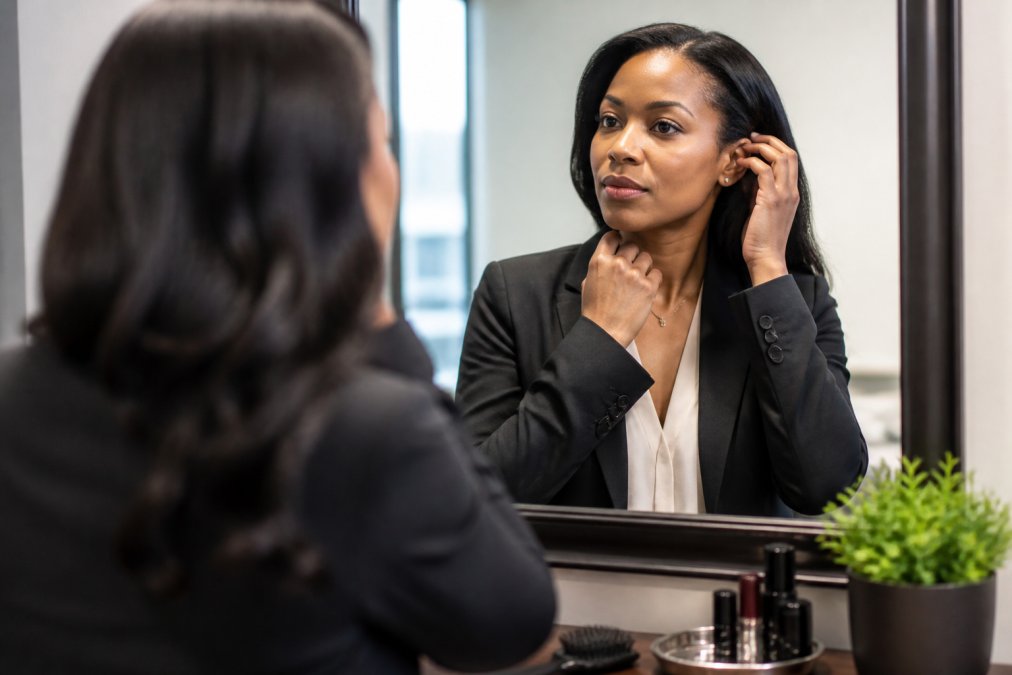
Makeup matters, even for men. Camera flash can wash out skin tone and create harsh shadows. Light makeup, foundation, subtle blush, and defined eyes, looks natural on camera while appearing barely-there in person. Women should consider:
- Foundation matching their skin tone exactly
- Eyeshadow in matte finishes (shiny finishes create glare)
- Mascara to define eyes under bright lights
- Lip color that complements their skin tone
Men should focus on:
- Light foundation to even skin tone
- Subtle grooming of eyebrows
- Lip balm to prevent dry lips
- Trimmed facial hair or clean-shaven look
Skin preparation matters. Employees should moisturize the night before and the morning of the shoot. Dry skin photographs poorly. Hydrated skin looks healthy and glowing.
Avoid heavy makeup. The goal is to look like a polished version of yourself, not a different person. If someone feels uncomfortable with makeup, a light foundation alone works fine.
The best grooming approach is enhancement, not transformation. Employees should look like their best selves, not like someone else entirely.
Corporate Headshot Email Template for Employees
Send this template three weeks before your session. Customize the details for your organization:
Subject: Your Professional Headshot Session is Scheduled [Date]
Hi [Employee Name],
We’re updating our corporate headshots on [Date] from [Time] to [Time] at [Location].
Hair and makeup tips:
- Wear your hair the way you normally do
- Light makeup enhances camera-ready appearance (optional but recommended)
- Avoid dramatic changes the day before the session
Preparation checklist:
- Confirm your scheduled time
- Plan your outfit and try it on beforehand
- Get a good night’s sleep the night before
- Arrive 5 minutes early to the session location
- Bring any questions or concerns
Questions? Contact [Your Name] at [Email] or [Phone].
Looking forward to capturing your professional image.
Best regards,
[Your Name]
Day-of Logistics and Post-Session Asset Management
The shoot day requires coordination across multiple stakeholders. Arrive 15 minutes early to test lighting and camera settings. Have employees arrive in staggered blocks rather than all at once, this reduces congestion, prevents bottlenecks, and keeps energy focused on individual sessions.
Proof Gallery and Selection Process
Digital Asset Management and Distribution
Storage and organization:
- Use a cloud-based folder structure (Google Drive, Dropbox, or SharePoint) organized by department or team
- Name files consistently: [LastName_FirstName_Date.jpg] so they’re easy to search
- Store both web-optimized (72 DPI, ~100 KB) and high-resolution (300 DPI, ~2-3 MB) versions in separate folders
- Include a metadata spreadsheet listing employee name, department, job title, and file location for quick reference
Platform-specific guidance for employees:
- LinkedIn: Upload the web-optimized version (72 DPI is sufficient for web display). Recommend a square crop (1:1 ratio) for optimal profile display. Suggest employees update their profile within 2 weeks of receiving their image to maximize visibility.
- Company directory and intranet: HR should upload high-resolution versions to internal systems. This ensures consistent quality across all company communications.
- Email signatures: Provide a template showing the recommended image size (100×100 pixels) and file format (JPG or PNG). Most email clients compress images, so web-optimized versions work fine.
- Slack and Teams: Employees can upload their headshot as a profile picture. Recommend square crops for consistency across the platform.
- Marketing and external materials: Only high-resolution versions should be used for print, websites, or promotional materials. Include a usage guideline document explaining this distinction.
Retention and updates:
Create a simple one-page “Headshot Usage Guide” for employees that explains where their image can be used, recommended file sizes for each platform, and who to contact if they need a different crop or version. This reduces confusion and ensures consistent brand representation.
Measuring ROI through asset tracking:
- Monitor LinkedIn profile updates: How many employees updated their profiles within 30 days of receiving their image? (Target: 70%+)
- Track internal directory usage: Are headshots being used consistently across your company intranet and employee directory?
- Measure employer branding impact: Compare website and LinkedIn page engagement before and after headshot rollout. Professional, consistent imagery typically increases click-through rates and profile views.
- Document feedback: Collect employee comments on confidence and professionalism. Positive feedback strengthens the case for future photography investments.
Frequently Asked Questions
What should employees wear for a professional corporate headshot?
Employees should wear clothing that reflects their daily work environment rather than forced formal wear. Solid colors and well-fitted attire photograph best. Avoid busy patterns, large logos, or anything that distracts from the face. The goal is visual consistency across your corporate headshot program while keeping employees comfortable and authentic. Provide specific guidance in your advance communication to ensure brand identity alignment.
How long does a corporate headshot session take per person?
Most professional corporate headshot sessions allocate 5-10 minutes per employee for individual shots. This timeframe allows photographers to capture multiple angles and expressions while maintaining quality without disrupting your team’s schedule. The actual duration depends on your photographer’s setup, lighting adjustments, and whether you’re doing on-site or studio sessions. Communicate this timeline to employees so they know what to expect.
How far in advance should I notify employees about a corporate headshot session?
Notify employees at least three weeks before an on-site corporate headshot session. This advance notice gives them time to plan wardrobe, schedule grooming appointments, and mentally prepare. Early communication also improves attendance and reduces last-minute scheduling conflicts. Include session details, dress code guidelines, and what to expect in your initial announcement.
How can I help employees feel comfortable during a headshot session?
Comfort directly affects how natural and authentic employees appear in the final images. Brief them on the session flow beforehand, explain the photographer’s approach, and encourage them to wear clothing that matches their work style. On the day of the shoot, allow time for people to settle in before images are captured. A skilled professional photographer can guide poses naturally rather than forcing stiff, artificial expressions.