
Table of Contents
- Why These Tips for Corporate Event Photography Actually Matter
- Essential Camera Gear and Settings for Corporate Events
- Flash Photography Techniques for Large Conference Halls
- Building Your Corporate Event Photography Shot List
- Event Photography Contract Template: What to Include
- Corporate Event Photography Pricing Guide
- Post-Processing Workflow, AI Tools, and On-Site Image Delivery
- Pro-Level Tips for Corporate Event Photography: Common Mistakes to Avoid
Last Updated: June 6, 2026
Why These Tips for Corporate Event Photography Actually Matter
The best tips for corporate event photography are not about gear lists or camera specs. They are about understanding what corporate clients actually need: documentation that serves a business purpose. At Event Photojournalism, we have covered hundreds of corporate conferences, galas, and stakeholder events across the DMV area, and the pattern is consistent: photographers who treat corporate work like a wedding shoot fail. The ones who treat it like visual journalism succeed.
A corporate event photograph is a brand asset appearing in annual reports, press releases, LinkedIn campaigns, and investor decks. The standard for "good enough" is entirely different from a family portrait session, and the consequences of missing a key moment are real.
Below, we cover every layer of the process, from gear selection and camera settings to contracts, pricing, post-processing with AI tools, and GDPR compliance.
Corporate event photography is the professional documentation of business gatherings, conferences, galas, and networking events, producing images that serve a client’s branding, communications, and marketing objectives.
Essential Camera Gear and Settings for Corporate Events
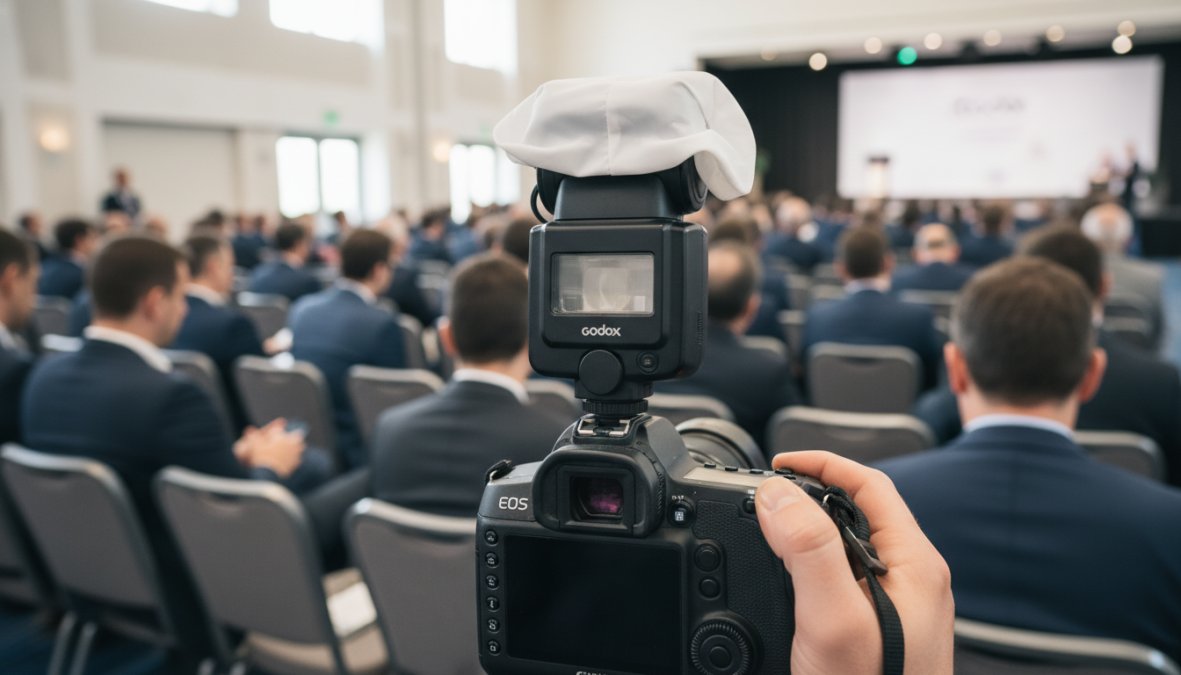
The right equipment for corporate event photography is determined by one factor above all others: light. Corporate venues, from hotel ballrooms to government conference centers, are notoriously difficult. Overhead fluorescent grids, mixed tungsten and daylight, and dimly lit stages create conditions that punish underpowered gear.
Choosing Between Full-Frame, Prime Lenses, and Zoom Lenses
Full-frame cameras are the professional standard for corporate event work. The larger sensor handles high ISO performance significantly better than crop-sensor bodies, which matters when shooting a keynote stage from 30 feet away in a room lit at 200 lux.
Bring both prime lenses and zoom lenses:
- Prime lenses (50mm f/1.4, 85mm f/1.8): Superior low-light performance, shallower depth of field for isolating speakers and executives, ideal for portrait-style headshots during networking
- Zoom lenses (24-70mm f/2.8, 70-200mm f/2.8): Flexible framing without moving through a crowd, essential for covering a stage from a fixed position
The 24-70mm f/2.8 is the workhorse lens for most corporate event work. The 70-200mm f/2.8 becomes critical in large conference halls where you cannot physically move closer to the action.
Mastering ISO, Aperture, Shutter Speed, and White Balance in Low-Light Environments
Camera settings for corporate events require a different starting point than outdoor or studio work. Begin with these baseline settings and adjust based on the specific venue:
| Setting | Starting Point | Adjust When |
|---|---|---|
| ISO | 1600-3200 | Stage lighting changes; go higher if needed |
| Aperture | f/2.8 | Depth of field too shallow: close to f/4 |
| Shutter Speed | 1/200s minimum | Motion blur visible: increase speed |
| White Balance | Custom / Kelvin | Mixed lighting sources present |
White balance is the setting most photographers set once and forget, a mistake at corporate events. A room can shift from warm tungsten spotlights on stage to cool overhead fluorescents in breakout areas within 50 feet. Shooting RAW files gives you flexibility to correct this in post, but getting in-camera white balance close saves significant editing time when delivering same-day content.
Always shoot RAW files at corporate events, never JPEG only. RAW files preserve the full sensor data, giving you recovery latitude for blown highlights on presentation screens and crushed shadows in dark venue corners. The file size increase is worth it every time.
Flash Photography Techniques for Large Conference Halls
Flash photography in large conference halls is where many photographers make their worst decisions. Pointing a bare speedlight directly at a speaker from 40 feet away produces harsh, unflattering light and draws attention that disrupts the event atmosphere. The correct approach involves three techniques used in combination.
Bounce flash redirects the flash head toward a ceiling or side wall, creating softer, diffused light. This works well in rooms with ceilings under 14 feet and neutral-colored walls, in rooms with dark or very high vaulted ceilings, bounce flash loses too much power to be effective. Flash with a diffuser softens the output at the source; products like the Gary Fong Lightsphere are the practical solution for high-ceiling conference halls where bounce flash fails. High-speed sync (HSS) becomes relevant when balancing flash with bright ambient sources such as large windows or stage lighting.
For very large halls where flash cannot reach effectively, push ISO higher and accept the grain rather than fire flash that reaches only the first three rows. Modern full-frame sensors handle ISO 6400 with manageable noise when shooting RAW and applying noise reduction in post.
Never use continuous red-eye reduction mode at corporate events. The pre-flash sequence causes subjects to blink and ruins otherwise strong candid shots. Disable it entirely.
Building Your Corporate Event Photography Shot List
A corporate event photography shot list is a pre-approved document listing every required image type, named individuals, and key moments that must be captured. It is the single most important planning tool for professional corporate work.
According to Professional Photographers of America’s business resources, the most common source of client dissatisfaction in event photography is unmet expectations about coverage, not image quality. A shot list eliminates ambiguity before the event starts.
A standard corporate event photography shot list includes:
- Venue exterior and entrance signage
- Registration desk with staff
- Pre-event networking and attendee arrivals
- Opening remarks: wide establishing shot, medium speaker shot, reaction shots from audience
- Panel discussions: individual panelists, moderator, audience engagement
- Award presentations: presenter, recipient, handshake moment, trophy/award close-up
- Keynote speaker: multiple angles, slide content visible, audience reaction
- Breakout sessions: room overview, presenter, attendee participation
- Sponsor signage and branded materials
- Executive portraits (if scheduled)
- Closing remarks and group photos
- Post-event networking
Scouting the Venue and Aligning With the Event Schedule
Venue scouting is non-negotiable. A 30-minute walkthrough the day before answers critical questions: where is the light worst, where will the stage be positioned, what are the restricted areas, and where can you position yourself without blocking attendees. Align your shot list against the event schedule in the order moments will occur, noting the timing of award presentations and keynote speakers specifically, these are the moments where missing the shutter release has the highest cost.
Communicating Stakeholder Needs With Event Planners
The event planner is your most important relationship on any corporate job. They know the agenda changes, the VIP list, the sponsor priorities, and the non-negotiable moments. Schedule a 20-minute call no later than 48 hours before the event. Ask specifically: Who are the named executives that must appear in images? Are there any restricted moments? What is the primary use case, internal communications, press release, or social media?
Event Photography Contract Template: What to Include
Every corporate event photography engagement requires a signed contract before work begins. A complete event photography contract template includes these sections:
- Scope of coverage: Date, venue, hours, number of photographers
- Deliverables: Number of final edited images, file format, resolution specifications
- Delivery timeline: When the client receives images and through what method
- Payment terms: Deposit amount, balance due date, late payment policy
- Cancellation policy: Client cancellation fees, photographer cancellation obligations
- Image rights: Who owns the images and under what conditions
- Usage license: How the client may use the images and for how long
- Model releases: Responsibility for obtaining releases from identifiable individuals
- Limitation of liability: Equipment failure, force majeure clauses
- GDPR and data privacy terms: How images of individuals will be stored, processed, and shared
As documented in ASMP’s guide to photography contracts, image rights and usage terms are the sections most likely to generate disputes. Write them with specificity, not general language.
Image Rights, Corporate Branding, and GDPR Compliance
The standard arrangement grants the client a broad usage license for internal and external communications while the photographer retains copyright. Full copyright transfer requests should be reflected in the pricing structure.
GDPR compliance is a gap topic that almost no corporate photography guide addresses. Under the UK and EU General Data Protection Regulation framework, photographs of identifiable individuals constitute personal data. For photographers working with multinational corporations or events attended by EU or UK residents, this has practical implications:
- Images of attendees may require a lawful basis for processing (legitimate interest or consent)
- Contracts should specify how long images will be retained and by whom
- If images will be shared with third parties (press agencies, sponsors), this should be disclosed
- Attendee-facing signage notifying participants of photography is a practical compliance step
Financial services, healthcare, and government contractors take data privacy seriously. A photographer who addresses GDPR in their contract template stands out from competitors who do not.
Corporate event photography contracts that address GDPR and image rights explicitly signal professional competence to enterprise clients. This single differentiator justifies higher pricing and builds long-term client trust in regulated industries.
Corporate Event Photography Pricing Guide
Corporate event photography pricing varies based on event duration, deliverable scope, number of photographers, and usage rights. The following ranges reflect professional market rates for the DMV area and comparable major metropolitan markets in 2026.
| Coverage Type | Duration | Typical Range | Includes |
|---|---|---|---|
| Half-day coverage | Up to 4 hours | $800-$1,500 | 1 photographer, 50-100 edited images |
| Full-day coverage | 8 hours | $1,500-$3,000 | 1 photographer, 150-300 edited images |
| Multi-day conference | 2-3 days | $3,000-$7,000+ | 1-2 photographers, full deliverable set |
| Premium with second shooter | Full day | $2,500-$4,500 | 2 photographers, priority turnaround |
Key pricing structure decisions:
Usage rights premium: Full copyright transfer or broad commercial licensing warrants a 25-50% increase over the base rate. Rush delivery premium: Same-day or next-day delivery commands a 20-40% premium. Travel fees: Events outside your standard service area should include travel time billed at your hourly rate plus transportation costs.
Many photographers underprice corporate event work by benchmarking against consumer portrait rates. Corporate clients have larger budgets, clearer deliverable expectations, and images that serve a measurable business purpose. Price accordingly.
Post-Processing Workflow, AI Tools, and On-Site Image Delivery
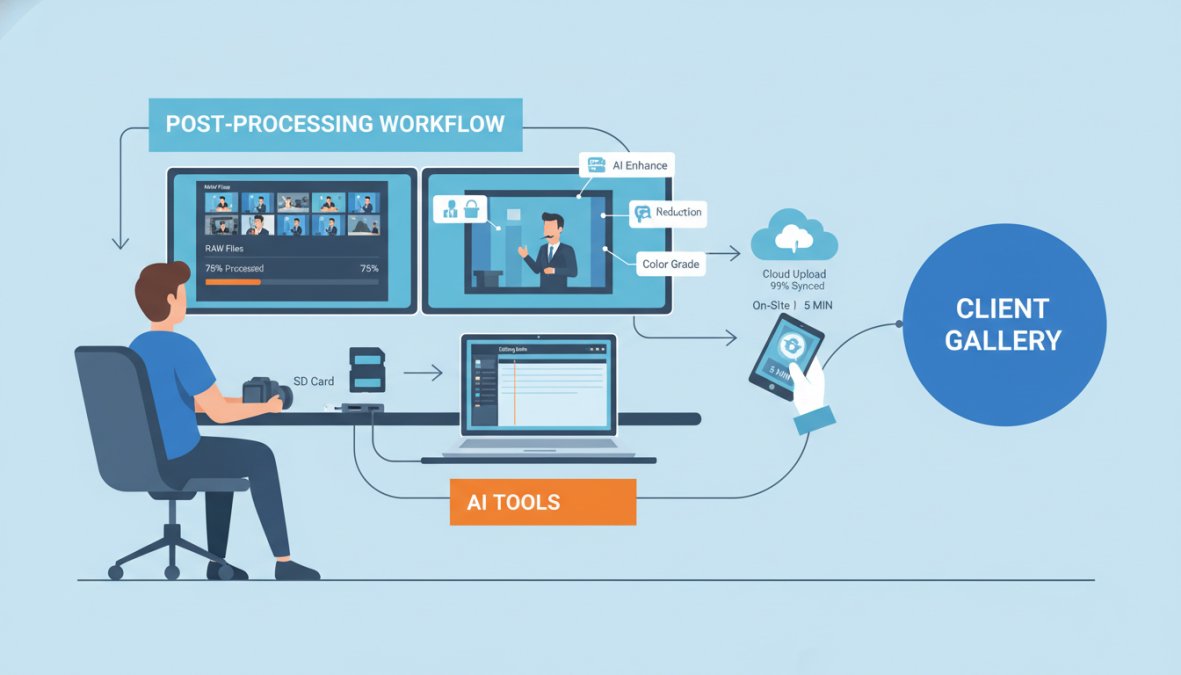
Post-processing workflow is where professional photographers gain or lose significant time. A 500-image delivery from a full-day conference without a structured workflow can consume 10-15 hours of editing time. With a structured approach, the same job takes 3-5 hours.
AI-Assisted Batch Editing and RAW File Management
AI-assisted batch editing is the most significant workflow development in corporate event post-processing. Tools like Adobe Lightroom’s AI masking, Luminar Neo, and Topaz Photo AI now handle noise reduction, subject masking, and lens correction that previously required manual image-by-image adjustment.
The practical workflow for corporate event RAW file management:
- Ingest and backup immediately: Copy cards to two separate drives on-site before editing begins.
- Cull first: Use Lightroom’s star rating or Photo Mechanic to select the best frames before editing. Do not edit rejects.
- Apply a base preset: Develop a preset calibrated to your most common corporate venue conditions and apply it across all selected images.
- Use AI noise reduction: At ISO 3200 and above, apply batch AI noise reduction before fine-tuning exposure. Topaz DeNoise AI and Lightroom’s AI Denoise produce results that were impossible with traditional noise reduction two years ago.
- Batch export: Export final images at the specified resolution and format per the contract deliverables.
Use multiple cards rather than one high-capacity card. If a single card fails during a conference, you lose everything. Rotating two or three cards throughout the day limits the exposure of any single failure.
On-Site Social Media Integration and Same-Day Deliverables
Many organizations want images posted to LinkedIn or internal platforms within hours of a keynote. The practical setup requires a dedicated editing station at the venue, a laptop with Lightroom, a fast card reader, and a reliable internet connection allows a second team member to begin culling and editing while the primary photographer continues shooting. A selection of 10-20 priority images can be edited and delivered within 90 minutes of a keynote session ending.
According to Content Marketing Institute’s B2B event marketing resources, real-time social content from corporate events drives significantly higher engagement than post-event recaps published days later. For photographers offering this service, the contract should specify how many images will be delivered same-day, in what format, and who has approval authority before posting.
Pro-Level Tips for Corporate Event Photography: Common Mistakes to Avoid
These are the mistakes that separate photographers who get referrals from those who get one-time bookings.
Mistake 1: Arriving without a confirmed shot list. Confirm the shot list directly with the decision-maker who hired you, not just the logistics coordinator.
Mistake 2: Ignoring battery management. A full-day corporate event drains batteries faster than most photographers expect. Bring at least three fully charged batteries per camera body.
Mistake 3: Shooting only the stage. Audience reaction shots, networking moments, and candid interactions between executives are often the images clients use most in communications.
Mistake 4: Underestimating the importance of corporate branding in frame. Sponsor logos and branded backdrops are often contractual requirements for the client’s sponsor relationships. Ensure branded elements appear clearly in a portion of your coverage.
Mistake 5: Delivering too many images. A curated delivery of 200 strong images is more valuable than a dump of 800 mediocre ones. Editing judgment is part of the service.
Mistake 6: Skipping the post-event debrief. A 15-minute call after image delivery to review what worked is the single most effective way to secure repeat bookings. Most photographers skip it. The ones who do it consistently build long-term corporate photography relationships.
Portfolio building also deserves attention. Organize your portfolio by event type, conferences, galas, award ceremonies, and networking events as separate categories. As noted in the American Society of Media Photographers’ business practices guide, photographers who specialize and communicate that specialization clearly command higher rates and attract more consistent corporate work than generalists.
Frequently Asked Questions
What equipment do I need for corporate event photography?
For corporate event photography, a full-frame camera body is strongly recommended for its low-light performance. Pair it with a fast prime lens (such as a 35mm or 50mm f/1.8) for candid shots and a zoom lens (24-70mm) for versatility. An external flash with a diffuser, extra memory cards, and spare batteries are essential on-site backup items. A second camera body is also advisable for professional redundancy at high-stakes events.
What should be included in a corporate event photography shot list?
A strong corporate event photography shot list should cover: executive headshots and speaker portraits, wide establishing shots of the venue, candid networking moments, branded signage and sponsor displays, audience reaction shots, award or presentation highlights, and group photos of key stakeholders. Share the shot list with the event planner in advance to align on priorities, confirm the event schedule, and identify any restricted areas or VIP moments requiring special access.
What are the best camera settings for indoor corporate events?
For indoor corporate events, start with a wide aperture (f/1.8-f/2.8) to allow maximum light, set shutter speed to at least 1/200s to freeze motion during presentations, and adjust ISO between 1600-6400 depending on venue lighting. Always shoot in RAW format for maximum post-processing flexibility. Set white balance manually or use a custom preset to avoid color casts from mixed artificial lighting common in conference halls and ballrooms.
How much should I charge for corporate event photography?
Corporate event photography pricing varies by market, experience, and deliverables. Common structures include an hourly rate, a half-day or full-day flat rate, or event packages bundling hours, edited images, and licensing. Factors that affect pricing include travel, turnaround time, on-site image delivery, and usage rights for corporate branding. Research your local market and competitor pricing, then build packages that clearly communicate value, including the number of high-resolution images and the editing workflow included.
How do you handle GDPR and data privacy in corporate event photography?
In corporate settings, especially for international clients, GDPR compliance is a real concern. Best practices include obtaining written consent through the event contract or a separate model release, clearly defining image rights and usage in your deliverables agreement, avoiding publishing identifiable images of attendees without consent, and securely storing and deleting client files per agreed timelines. Always clarify data handling procedures with the event planner before the shoot to protect both parties.
Event Photojournalism brings award-winning photography expertise to corporate conferences, galas, and special events across Washington DC and Northern Virginia. If you need reliable, high-resolution documentation that elevates your brand and ensures every important moment is captured with precision, the team at Event Photojournalism delivers customized coverage built around your event’s specific stakeholder needs and communication goals. CONTACT US to discuss your next corporate event.
This article was written using GrandRanker