Table of Contents
- 1. Create Social Media Carousel Posts from Event Photos
- 2. Build Email Newsletter Content with Event Highlights
- 3. Develop Blog Posts and Case Studies Around Event Coverage
- 4. Design Infographics and Data Visualizations from Event Insights
- 5. Produce Short-Form Video Clips for Social Platforms
- Tools for Editing Event Photos for Social Media
- Event Content Strategy Best Practices
- Measuring ROI from Repurposed Event Photos
Last Updated: August 9, 2026
1. Create Social Media Carousel Posts from Event Photos
Social media carousel posts transform individual event photos into engaging multi-slide stories that stop the scroll. Start with your sharpest, most compelling photo as the first slide, your hook. Follow with 3-5 additional images showing progression or different angles, then end with a call-to-action slide: "Tag yourself in the comments" or a link to your full gallery.

Event Photojournalism captures the candid, high-resolution moments that anchor these carousels, genuine reactions and authentic interactions that drive engagement. Professional polish measurably improves carousel performance over single-image posts.
Platform specifics matter. Instagram carousels reward visual consistency: use the same filter across all slides. LinkedIn works best with 3-4 slides maximum. TikTok and Reels pivot these images into video sequences instead.
Canva ($12.99/month premium) lets you drop photos into pre-sized frames, maintain brand colors automatically, and export all slides at once. Batch-edit your event photos first in Adobe Lightroom ($9.99/month Photography Plan) to ensure consistent color grading across carousel slides.
Pro Tip: A unified look signals professionalism and makes your carousel feel intentional, not like a random photo dump.
2. Build Email Newsletter Content with Event Highlights
Email newsletters convert attendees into repeat participants and committed supporters. Start with a subject line hinting at exclusivity: "What you missed (and what happened after)" outperforms generic "Event recap" lines. Open with 2-3 standout photos, follow with brief narrative, embed 1-2 attendee testimonial quotes, and close with a gallery link or CTA to next year’s event.
Keep the email scannable; most readers won’t scroll past the fold. Limit yourself to 5-8 photos maximum with clear captions. Personalized emails generate 6x higher transaction rates compared to generic blasts.
Segment your audience strategically. Send VIP sponsors a separate email highlighting their booth. Send donors a different message than general attendees. Tools like Sprout Social ($79/seat/month), Mailchimp, or Klaviyo handle segmentation and track open rates effectively.
Common Mistake: Dumping 50 photos into one email. Readers overwhelm quickly, and quality editing matters as much as quantity.
3. Develop Blog Posts and Case Studies Around Event Coverage
Blog posts give event photos permanent real estate on your website, boosting SEO and providing long-term value. A well-structured event post can rank for branded keywords and drive traffic months later.
Start with a headline including the event name and year: "2026 Spring Gala: Photos, Highlights, and Key Moments." Open with 2-3 hero images conveying the event’s tone. Break the post into logical sections: Highlights (3-4 captioned photos), Speakers & Panels (key presenters), Attendee Moments (networking and candid interactions), and What’s Next (upcoming events or CTAs).
For nonprofits and associations, case studies are particularly powerful. Structure as: Challenge (why we held this event) → Solution (what we did) → Results (what happened). Include photos at each stage. If you raised $50,000 at a gala or gained 200 new members, feature those stats. Donors and board members want proof that events generate outcomes.
Maintain consistent branding across all photos. Event Photojournalism’s award-winning approach to capturing professional environments means your photos will already align with most corporate brand standards, requiring minimal post-processing.
Embed your blog post with internal links to past event posts and upcoming event registration pages. This keeps readers on your site longer and signals to search engines that you’re an authority on your event series.
4. Design Infographics and Data Visualizations from Event Insights
Infographics package event data into shareable, visual formats that perform exceptionally well on social media and in presentations. Common event infographics include attendance breakdown by industry or region, key statistics from presentations, attendee demographics, or timeline graphics showing event flow.
The best infographics combine one or two striking photos with clean typography and minimal data points. Canva’s infographic templates ($12.99/month premium) make this accessible without design experience. For more complex visualizations, Adobe Creative Cloud’s Photography Plan ($9.99/month) includes Illustrator for pixel-perfect control.
The data itself matters more than the design. If your conference attracted 500 attendees from 30 states or 75% said they’d return next year, feature that prominently. Infographics work best when they reveal something the raw numbers don’t immediately convey.
What Most Guides Miss: Infographics don’t need to be complicated. A single striking event photo with three overlaid statistics often outperforms a dense multi-panel design. Simplicity increases shareability.
5. Produce Short-Form Video Clips for Social Platforms
Short-form video is where social media engagement happens now. Reels, TikTok, and Shorts reward video content over static images. Identify your best video moments: a keynote speaker’s most quotable line, an unexpected emotional reaction, a time-lapse of the venue filling up, or networking conversations showing genuine connection.
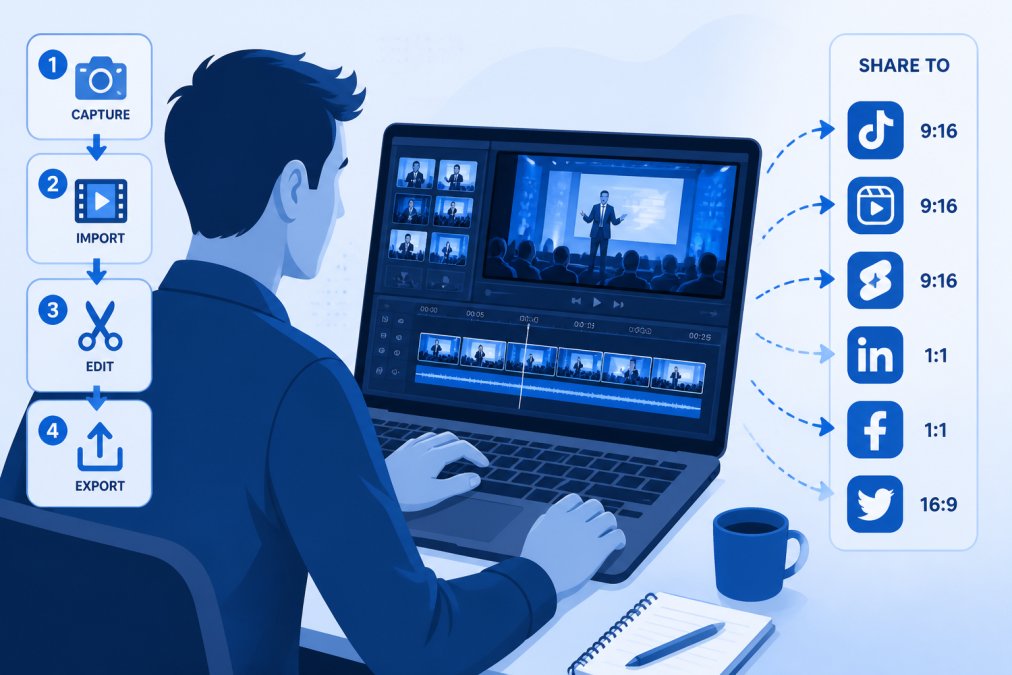
Animoto ($8/month) is purpose-built for this workflow. Upload photos and short video clips, select a template, add music from their licensed library, and export optimized versions for each platform. The paid plan removes branding and delivers 1080p exports, essential for professional use.
For more control, Adobe Creative Cloud’s Photography Plan includes Premiere Rush, a simplified video editor handling basic cuts, transitions, and color grading. InVideo AI ($17/month) offers AI-assisted editing with auto-generated cuts, captions, and music suggestions, fastest if producing dozens of clips.
Platform-specific optimization matters. Instagram Reels perform best at 9:16 aspect ratio with burned-in captions. TikTok rewards 30-60 second videos with strong hooks in the first 3 seconds. LinkedIn video performs best at 1:1 square format with professional framing.
The most-shared event videos combine authentic moments with clear context. A 30-second clip of a speaker’s key insight with on-screen text highlighting the takeaway outperforms generic networking footage.
Tools for Editing Event Photos for Social Media
Adobe Creative Cloud Photography Plan
Adobe’s Photography Plan ($9.99/month) bundles Lightroom and Photoshop, the industry standard for photo professionals. Lightroom handles batch editing, organization, and cloud sync. Photoshop handles advanced retouching, compositing, and graphic design.
For event photos, Lightroom’s workflow is unmatched. Import hundreds of photos, apply a consistent preset to all of them, then fine-tune individual shots. The cloud sync makes edits accessible from any device. AI features like Generative Remove handle distracting backgrounds or unwanted objects with a few clicks.
Photoshop handles complex edits: removing photobombers, combining multiple exposures for perfect lighting, or creating social media graphics overlaying photos with text. The learning curve is steeper than Canva, but capability is exponentially greater. The con: subscription-only pricing means recurring costs. For teams producing content regularly, Adobe’s ecosystem is unmatched.
Canva for Quick Social Graphics
Canva ($12.99/month premium, free tier available) is the fastest path from event photos to polished social posts. Drag photos onto templates, adjust text, and export. No Photoshop skills required.
Canva excels at speed and consistency. Create a brand kit with your colors, fonts, and logo, and every design automatically inherits those standards. The template library covers carousels, stories, reels, infographics, and more. The free tier is surprisingly capable; the paid plan adds thousands more templates and removes Canva branding from exports.
Limitation: Canva’s photo editing is basic. Handle significant retouching in Lightroom first, then bring polished images into Canva.
Animoto for Video Creation
Animoto ($8/month, free tier available) turns static photos into dynamic video with minimal effort. Upload 10-20 event photos, choose a template and music track, and Animoto generates a finished video in minutes.
The free tier includes Animoto branding and lower resolution (720p). The paid plan removes branding and exports at 1080p, professional quality suitable for corporate communications. Animoto works best when you have a clear narrative arc for your photos, showing event progression tells a complete story. The trade-off: less creative control than editing software, but if you need polished video fast without editing experience, Animoto is ideal.
Event Content Strategy Best Practices
Plan Your Repurposing Workflow Before the Event
The most common mistake is treating photo repurposing as an afterthought. Instead, plan your content calendar before the event happens. Decide in advance which platforms will receive content, what formats you’ll produce, who owns each piece, and your timeline.
This planning clarifies what photos you actually need. Brief your photographer in advance. Event Photojournalism’s team can capture specific moments if you communicate priorities: VIP arrivals, speaker presentations, networking candids, group photos. This targeted approach yields more usable content than hoping the photographer captures what you need.
Failing to plan your repurposing workflow before the event guarantees wasted photos and missed content opportunities.
Organize and Tag Photos for Easy Access
Create a clear folder structure: Year > Event Name > Category (Speakers, Attendees, Venue, Details). Within each category, tag photos with descriptive keywords: names of speakers, company names, moment descriptions.
Adobe Lightroom’s keyword tagging system ($9.99/month) is sufficient for most teams. A tagged photo library is searchable, finding "photos of attendees from the tech industry" takes seconds instead of scrolling through 500 images.
Maintain Brand Consistency Across Channels
Establish guidelines before repurposing: Do all social posts use the same filter? Do all photos include your logo or watermark? Are captions styled consistently?
Canva’s brand kit feature ($12.99/month premium) automates this. Set your brand colors, fonts, and logo once, and every design template inherits those standards. For photos themselves, consistency often means limiting your editing. If your first carousel uses warm, saturated colors, your second should match.
Legal Considerations for Using Event Photos
Clarify rights and permissions before repurposing. Who owns the photos? Can you use attendee photos in marketing materials?
If Event Photojournalism captured your event, clarify the licensing agreement upfront. For attendee photos, best practice is getting signed photo release forms. A simple form stating "I grant [Organization] permission to use my photo in marketing materials" protects you legally.
Tag attendees when possible, this adds social proof and encourages sharing. If you’re repurposing photos in paid advertising, check your platform’s policies and attendee expectations.
What Most Guides Miss: Legal complexity increases if your event included minors, government officials, or sensitive locations. Consult your legal team before repurposing photos in these contexts.
Measuring ROI from Repurposed Event Photos
Repurposing event photos only matters if it drives measurable outcomes: engagement, leads, revenue, or mission impact. Define what success looks like for each format. For social carousels: engagement rate and click-through rate. For email: open rate and click rate. For blog posts: page views and conversion to event registration. For video: view completion rate and shares.
Use platform analytics. Instagram Insights shows carousel engagement by slide. LinkedIn analytics reveal which posts drive profile visits. Google Analytics tracks blog traffic and conversion paths. Sprout Social ($79/seat/month) or Buffer ($5/channel/month) aggregate analytics across platforms.
Use UTM parameters on links in repurposed content: ?utm_source=event_carousel or ?utm_medium=email_newsletter. This tags traffic in Google Analytics, showing which content formats drive actual conversions. Over time, you’ll see patterns: maybe video clips generate 3x more clicks than static carousels.
Most organizations underestimate the ROI of event photos because they don’t track it. Spend one week tagging your links and monitoring analytics. The data will reveal which repurposing formats actually drive outcomes for your organization.
Repurposing event photos transforms a one-day investment into months of marketing value. The difference between organizations that extract maximum value from their events and those that don’t often comes down to planning, organization, and measurement. Event Photojournalism’s high-resolution imagery gives you the raw material to succeed, professional-grade photos that look polished across every platform. Start with a clear content calendar, organize your photos systematically, and measure what actually drives engagement. The ROI will speak for itself.
Frequently Asked Questions
How do I organize event photos for content marketing?
Start by importing photos into a dedicated folder immediately after the event. Use consistent naming conventions (date-event-subject) and tag images by category: speakers, attendees, venue, moments. Digital asset management tools like PhotoShelter for Brands help automate tagging and make retrieval faster. Create a spreadsheet documenting which photos work best for which channels, noting resolution, orientation, and key subjects. This organization saves hours when repurposing content across multiple platforms.
What are the legal considerations for using event photos in marketing?
Always obtain written permission from attendees before using their images in promotional materials. For events with paid photographers, clarify ownership and usage rights in your contract, professional photographers retain copyright unless explicitly transferred. Respect privacy expectations: some attendees may agree to photos for internal use only, not public social media. For employee or volunteer photos, document consent separately. If using photos on your website or marketing materials, ensure compliance with your state's privacy laws and your organization's data protection policies. Consider liability waivers for future events.
What tools work best for editing event photos for social media?
Adobe Lightroom and Photoshop offer professional-grade editing for color correction and detailed adjustments. Canva is faster for creating social graphics and carousel layouts without design experience. For video, Animoto and InVideo AI turn static photos into dynamic content quickly. Buffer and Sprout Social handle scheduling and distribution once your visuals are ready. Choose based on your team's design skills: Adobe for precision, Canva for speed, and video tools for multi-format repurposing.
How can I turn event photos into lead generation assets?
Create gated content: require email signup to download a high-resolution photo gallery or behind-the-scenes video from the event. Feature attendee photos in case studies or testimonials with their permission, driving engagement and trust. Use carousel posts with a call-to-action linking to a landing page for your next event or service. Embed photos in email campaigns to sponsors and past attendees, encouraging them to register for future events. Track which visual assets drive the most clicks and conversions to refine your content strategy.
What's the best way to use event photography on social media?
Post within 24 hours while momentum is high. Use carousel posts to tell a visual story of the event, opening, key moments, attendee interactions, closing. Tag attendees and sponsors to expand reach. Mix candid shots with speaker or keynote images for variety. Post consistently across Instagram, LinkedIn, Facebook, and Twitter, tailoring formats to each platform. Pair photos with captions that include event hashtags, attendee quotes, or key takeaways. Schedule reposts of top-performing photos weeks later to extend their lifespan and reach new followers.
This article was written using GrandRanker